

How to Add and Manage Your Team on Tribe
May 5, 2026 - 2 MINUTES READ

Table of content
How to Add and Manage Your Team on Tribe
Scaling your brokerage operations requires a platform that makes collaboration seamless. With Tribe, adding and managing your team is simple, secure, and designed to get your colleagues up and running in seconds.
Scaling your brokerage is as simple as a single click. Build a faster, smarter team with Tribe.
Step 1: Access Your Team Settings
To begin, log into your account and navigate to the Settings menu on the left-hand sidebar. From there, select the Team tab to view your current members and pending invitations.
Step 2: Invite a New Team Member
Click the + Invite Team Member button. You will be prompted to enter your colleague’s email address. You also have the option to include a personal welcome message to introduce them to the platform.
Step 3: Assign the Right Role
Control your team's level of access by selecting one of three distinct roles:
- Admin: Full access to all company data, settings, and team management.
- Manager: Can view all company quotes but is restricted from changing system settings.
- Member: The most focused role; they can only see their own quotes and items specifically shared with them.
Once selected, hit Send Invitation.
Step 4: The Onboarding Process
Your teammate will receive a professional, branded email invitation. All they need to do is:
- Click Accept Invitation in the email.
- Set up their credentials (name and password).
- Complete a quick verification.
Bear in mind that the invite lasts only for 7 days.
Once verified, they are officially part of your team and will be redirected to the dashboard.
Step 5: Immediate Collaboration
Once onboarded, your new team members can immediately begin searching trips and sending charter requests. This streamlined workflow ensures your brokerage stays fast, smart, and competitive.
Ready to build a faster, smarter brokerage?Start your free trial now at app.flytribe.ae and see how Tribe can transform your business.
Scaling your brokerage is as simple as a single click. Build a faster, smarter team with Tribe
Heading 1

Heading 2
Heading 3
Heading 4
Heading 5
Heading 6
Lorem ipsum dolor sit amet, consectetur adipiscing elit, sed do eiusmod tempor incididunt ut labore et dolore magna aliqua. Ut enim ad minim veniam, quis nostrud exercitation ullamco laboris nisi ut aliquip ex ea commodo consequat. Duis aute irure dolor in reprehenderit in voluptate velit esse cillum dolore eu fugiat nulla pariatur.
Block quote
Ordered list
- Item 1
- Item 2
- Item 3
Unordered list
- Item A
- Item B
- Item C
Bold text
Emphasis
Superscript
Subscript
Author:

Share on:


Challenger 350 vs Citation Latitude
Challenger 350 Vs Citation Latitude
27 June 15 Minutes read
In this article, we explore the difference between two of the best super-midsize jets.
Heading 1
Heading 2
Heading 3
Heading 4
Heading 5
Heading 6
Lorem ipsum dolor sit amet, consectetur adipiscing elit, sed do eiusmod tempor incididunt ut labore et dolore magna aliqua. Ut enim ad minim veniam, quis nostrud exercitation ullamco laboris nisi ut aliquip ex ea commodo consequat. Duis aute irure dolor in reprehenderit in voluptate velit esse cillum dolore eu fugiat nulla pariatur.
Block quote
Ordered list
- Item 1
- Item 2
- Item 3
Unordered list
- Item A
- Item B
- Item C
Bold text
Emphasis
Superscript
Subscript

AIRBUS ACJ320NEO
ACJ320neo Private Jet
18 December 15 Minutes read
The ACJ320neo combines advanced technology, luxury, and long-range capabilities, offering a superior flying experience. With its customizable interior and eco-efficient design, it’s ideal for both business and leisure travel.
Heading 1
Heading 2
Heading 3
Heading 4
Heading 5
Heading 6
Lorem ipsum dolor sit amet, consectetur adipiscing elit, sed do eiusmod tempor incididunt ut labore et dolore magna aliqua. Ut enim ad minim veniam, quis nostrud exercitation ullamco laboris nisi ut aliquip ex ea commodo consequat. Duis aute irure dolor in reprehenderit in voluptate velit esse cillum dolore eu fugiat nulla pariatur.
Block quote
Ordered list
- Item 1
- Item 2
- Item 3
Unordered list
- Item A
- Item B
- Item C
Bold text
Emphasis
Superscript
Subscript
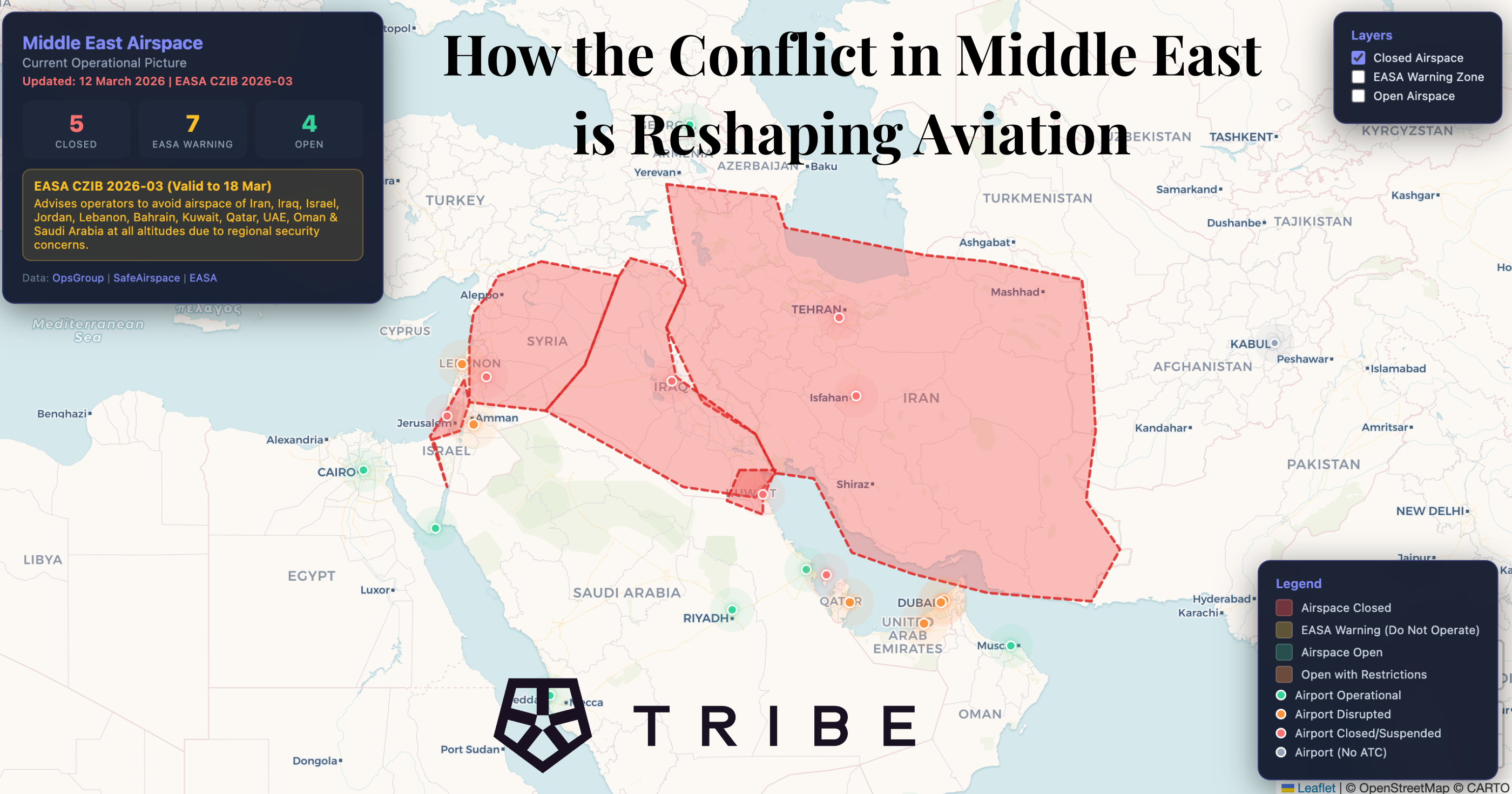
How the Iran Conflict Is Reshaping Aviation: Airspace Closures, Rerouted Flights
On 28 February 2026, coordinated strikes on Iran triggered the biggest aviation crisis since the Russia-Ukraine war and Covid closing airspace across eight countries, grounding 40,000+ flights, and sending private charter demand to record highs.
Heading 1
Heading 2
Heading 3
Heading 4
Heading 5
Heading 6
Lorem ipsum dolor sit amet, consectetur adipiscing elit, sed do eiusmod tempor incididunt ut labore et dolore magna aliqua. Ut enim ad minim veniam, quis nostrud exercitation ullamco laboris nisi ut aliquip ex ea commodo consequat. Duis aute irure dolor in reprehenderit in voluptate velit esse cillum dolore eu fugiat nulla pariatur.
Block quote
Ordered list
- Item 1
- Item 2
- Item 3
Unordered list
- Item A
- Item B
- Item C
Bold text
Emphasis
Superscript
Subscript
